
How to Capture a New Individual Donor
Use this form to add a new individual donor to your database.

Mandatory Fields: the following fields are required in order to be able to save the donor.
- First Name
- Last Name
Section 18A Required Fields: the following fields must be completed if you would like to issue a Section 18A certificate to the donor.
- First Name
- Last Name
- Nature of Person
- Initials
- Contact Number
- Contact Email
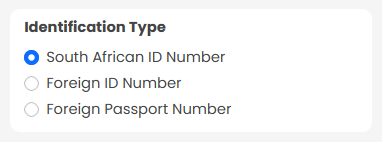
- Identification Type
- Identification Number
- Income Tax Number
- Address Line 1
- Postal Code
NB: Section 18A certificates cannot be issued via the system without all of the above information.
Rules and Validation
Identification Number:
-
If you choose "South African ID Number" as the donor's "Identification Type", the system will validate to ensure that the given "Identification Number" is a valid "South African ID Number".
Address:
- By default, addresses are auto-filled using Google Maps. If your address in not available on Google Maps (e.g. postal address), please ensure the "Province" is captured in "Address Line 3".
Date Of Birth:
-
If a valid "South African ID Number" is entered in the "Identification Number" field, the "Date of Birth" is automatically extracted and populated.
Requires 18A Certificates:
- This switch indicates whether or not the donor requires a Section 18A certificate for each of their donations. If switched on, then all Section 18A required fields become mandatory in order to save the donor.
Saving Donor Information

When a donor is captured successfully, you have the option to 'Capture a Donation' for the donor.
Click 'Yes, continue!' to capture the new donation or 'No', and you will get a blank new donor form to capture another donor.